Chapter 2
The Project Selection and Management
Learning Objectives
- Explain how projects are selected in some organizations.
- Describe various approaches to the SDLC that can be used to structure a development project.
- Explain how to select a project methodology based on project characteristics.
- Become familiar with project estimation.
- Be able to create a project work plan.
- Describe project staffing issues and concerns.
- Describe and apply techniques to coordinate and manage the project.
- Explain how to manage risk on the project
Project Selection
How specific projects are chosen
Project Selection Issues
Ways to Characterize Projects
| Size | What is the size? How many people are needed to work on the project? |
| Cost | How much will the project cost the organization? |
| Purpose | What is the purpose of the project? Is it meant to improve the technical infrastructure? Support a current business strategy? Improve operations? Demonstrate a new innovation? |
| Length | How long will the project take before completion? How much time will go by before value is delivered to the business? |
| Risk | How likely is it that the project will succeed or fail? |
| Scope | How much of the organization is affected by the system? A department? A division? The entire corporation? |
| Economic Value | How much money does the organization expect to receive in return for the amount the project costs? |
Project Selection Issues
- Approval committee uses the system request and the feasibility study
- Project portfolio perspective – how does the project fit within the entire portfolio of projects?
- This involves trade‐offs in which the organization must give up something in return for something else to keep its portfolio well balanced
Project Portfolio Management
- PPM software collects and manages information about all projects – on-going and awaiting approval.
- Companies stay up to date on projects and adapt to changing conditions. .
- Features: project prioritization, employee allocation, real-time project monitoring, flagging cost and time variances, monitoring economic feasibility.
Creating the Project Plan
- Once a project is approved, the project manager must:
- Select the best project methodology
- Develop a project work plan
- Establish a staffing plan
- Create ways to coordinate and control the project
Creating the Project Plan
Developing a plan for a successful result
Foosball.com
Developing a Project Plan
Foosball.com is a company with a presence of over 20 years. It offers e-commerce services for worldwide foosball enthusiasts through shop.foosball.com. The existing top-level domain name requires modernization to align with current industry standards.The competition from an Amazon-based e-commerce platform has made it challenging for the company to sustain its operational expenses. Both sites have seen a decrease in traffic over time.
"The stakeholders aim to boost e-commerce revenue, attract more visitors to the sites, support the foosball community, and preserve the legacy of the foosball brand and sport."
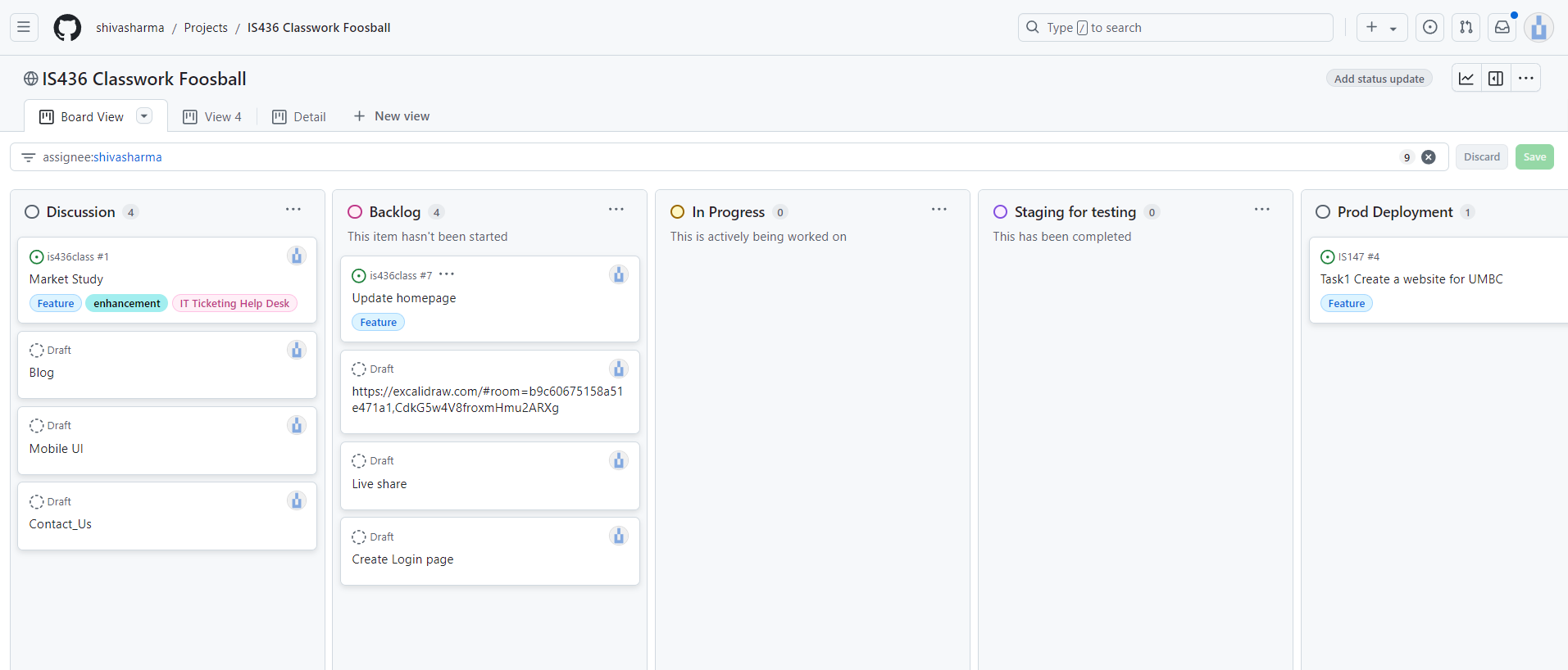
Project Plan
Selecting a Project Methodology
- Methodology: A formalized approach to implementing the SDLC: A series of steps to perform and deliverables to produce
- General business knowledge
- Internally developed by organizations
- Consulting firms
- Software vendors
- Government agencies
Methodology Sources
Selecting a Project Methodology - Issues
These factors influence the best choice
- Clarity of User Requirements How well do the users and analysts understand the functions and capabilities needed from the new system?
- Familiarity with Technology How much experience does the project team have with the technology that will be used?
- System Complexity How much complexity is anticipated in the new system? Does the new system include a wide array of features? Will the system have to integrate with many existing systems? Does it span multiple organizational units, or even multiple organizations?
- System Reliability Will this system need to be highly reliable or is some downtime tolerable?
- Short Time Schedules Is the project time frame tight?
- Schedule Visibility Are the project sponsors, users, or organizational managers anxious to see progress?
Structured Systems Development
- Methodologies
- Based upon SDLC
- Assumes a project phase is complete before moving to the next phase
- Waterfall Development
- Parallel Development
- V-model
- Goal – doing each phase thoroughly before moving forward ensures correct and high-quality outcomes
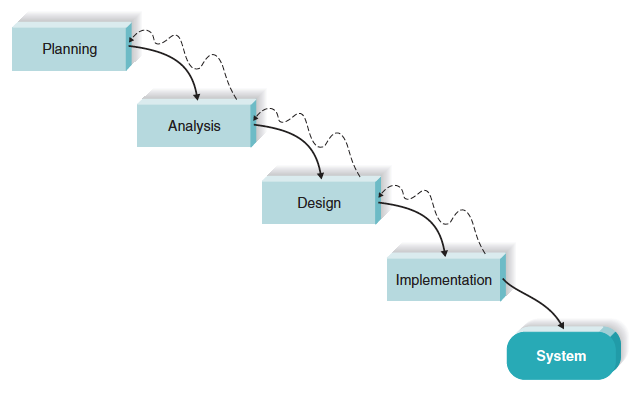
Waterfall Development Methodology
- One of the first and oldest methods
- Linear and step-by-step process
- Each phase leads to the next
- Focus on completing one phase before moving forward
- The result of one phase becomes the input for the next
- Requirements must be clear and fixed
- Works best when resources are available
- Suited for less complex applications
- Examples: supply chain, payment systems, e-commerce
Waterfall Methodology Assessment
| Strengths | weaknesses |
|---|---|
| System requirements identified long before construction begins | Must wait a long time before there is “visible” evidence of the new system |
| Requirements are “frozen” as project proceeds – no moving targets allowed | Takes a long time from start to finish |
| Easy to manage/ clearly defined stages | Not good where change is expected |
| Phases are completed one at a time | Poor Model for Long Term Projects |
| Process and results are well documented | No Scope Adjustment |
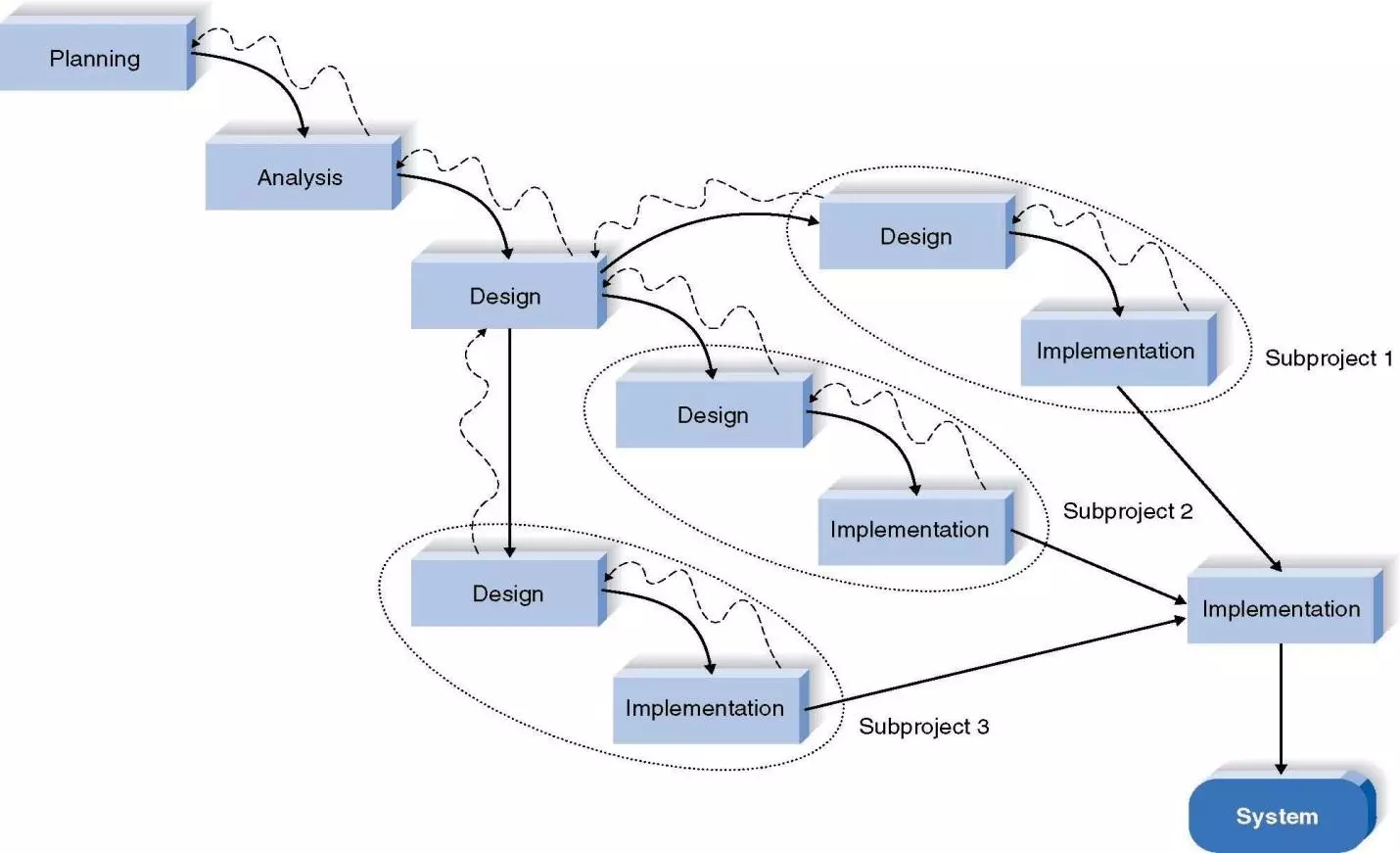
Parallel Development Methodology
- Project is divided into smaller sub-projects worked on in parallel
- Designed to address the long time frame of the waterfall model
- Speeds up development by reducing overall project duration
Parallel Methodology Assessment
| Strengths | Weaknesses |
|---|---|
| Reduces overall project time (compared to Waterfall) | Creating sub projects requires careful design decisions |
| Reduces the need for rework; with shorter time frame, less chance of requirements changing | Integrating sub projects at the end can be complex and difficult |
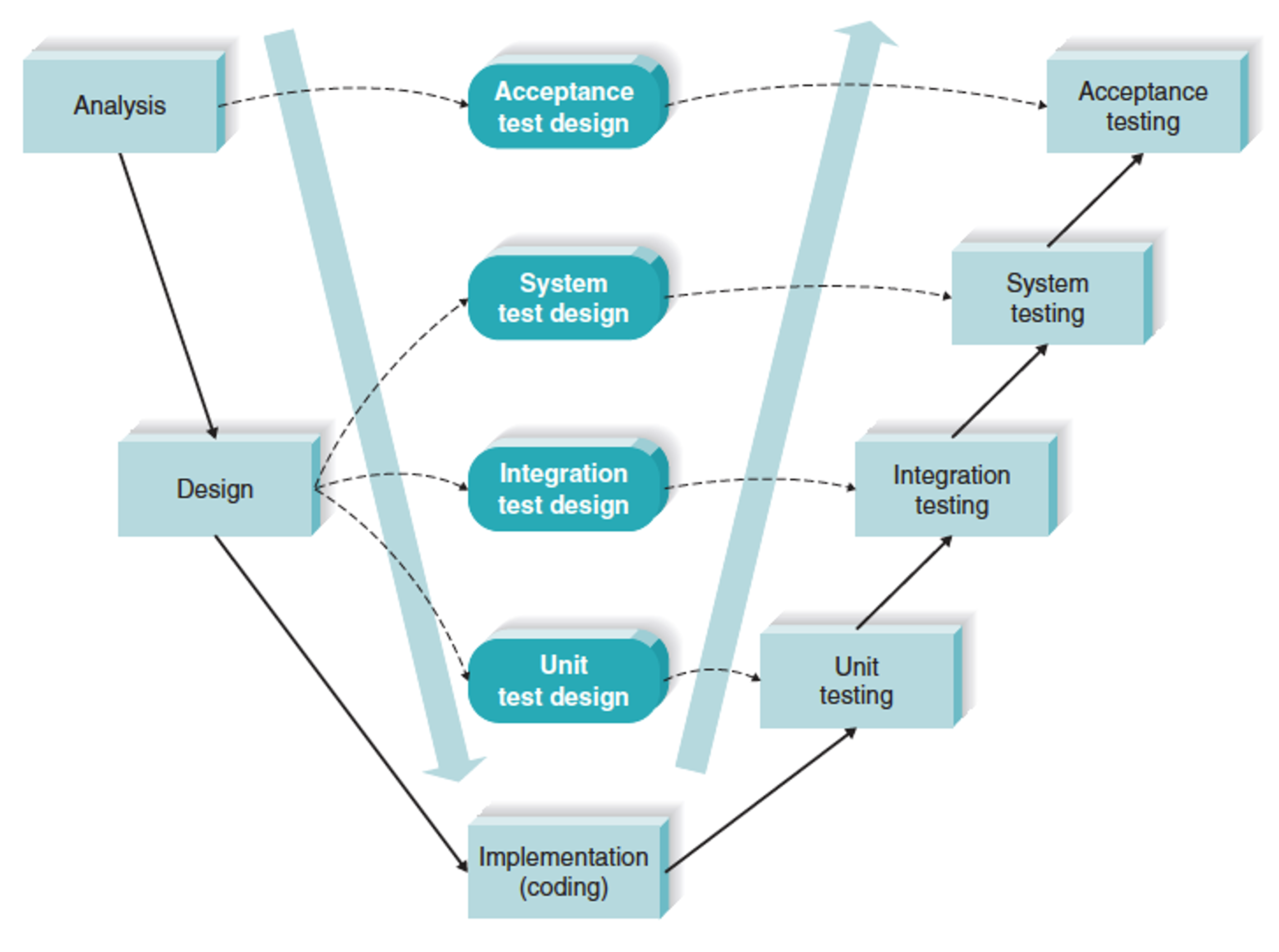
V-Model Development Methodology
- Also called the Verification and Validation Model
- Modified version of the waterfall model
- Focuses on system quality through detailed test planning
- Each development stage has a matching testing phase
- Best when technology is well understood
- Clear and unambiguous requirements are needed
- Suitable for small to medium-sized projects
- Examples: medical industry, government projects
V-Model Methodology Assessment
| Strengths | weaknesses |
|---|---|
| Simple and straightforward | Rigid |
| Quality improves through the emphasis on testing | Difficult to use in a dynamic business environment |
| Including Quality Assurance expertise early in the project strengthens system quality | High risk and uncertainty | Not good for complex projects |
| Once in testing, difficult to go back | No working software is produced until late in the day |
Rapid Application Development
- Incorporate special techniques and tools:
- CASE tools
- JAD sessions
- Visual programming languages
- Code generators
- Goal – get some portion of system developed quickly and in the users’ hands
Three RAD Approaches
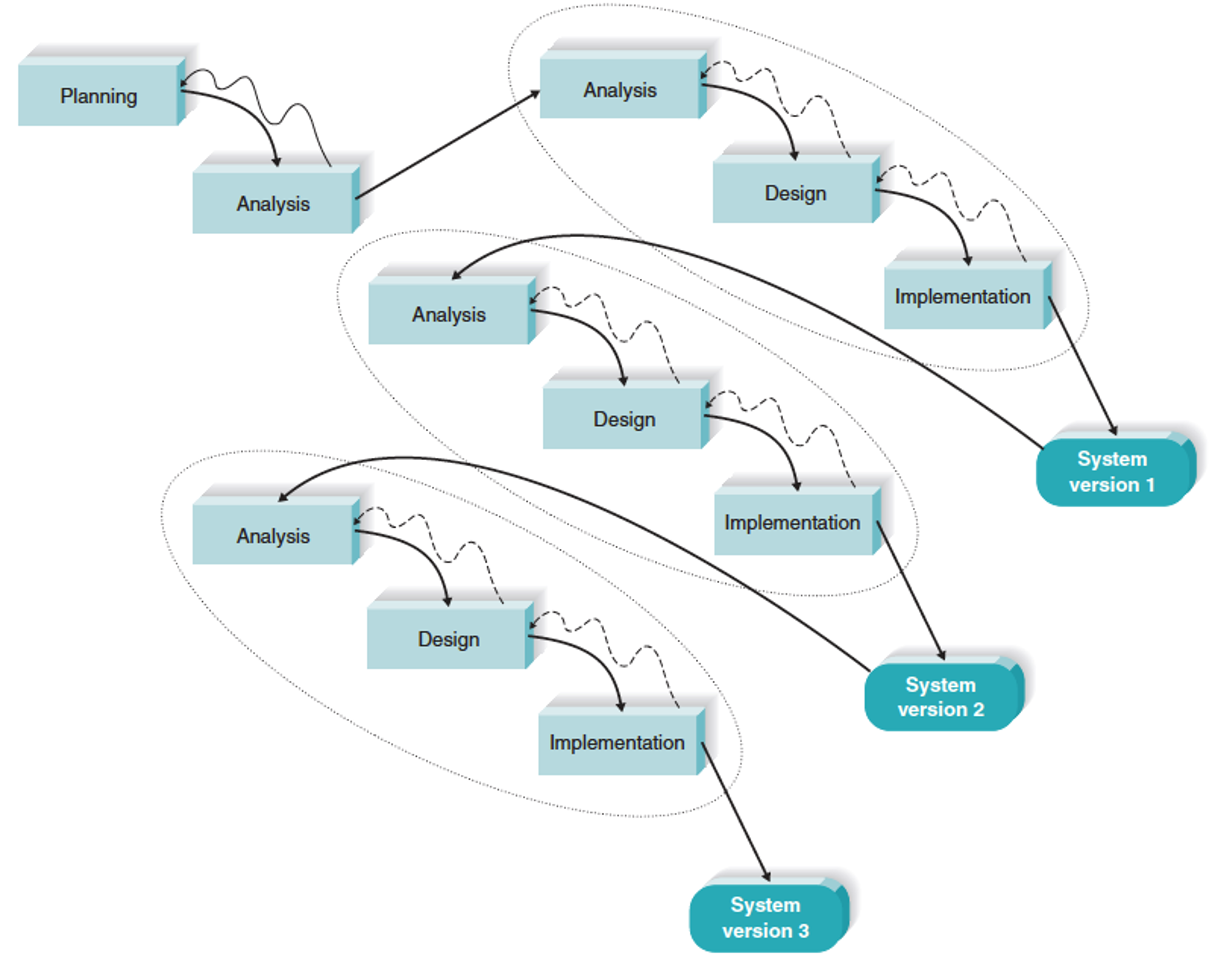
- Iterative development
- A series of versions developed sequentially
- System Prototyping
- Create prototype (model) of system and “grow” it into the final system
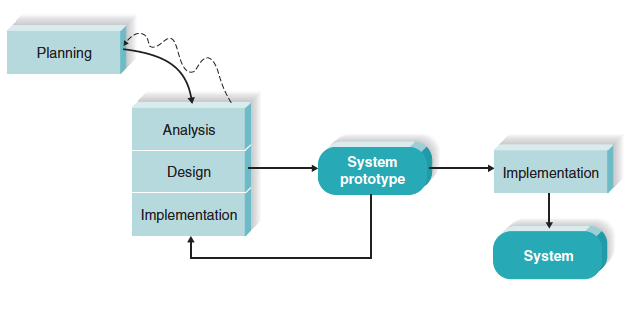
- Throw-away prototyping
- Prototype alternative designs in an experimental way
- Build system following prototype design but discard the actual prototype
Iterative Development Methodology
- System is developed in multiple versions
- Start with a small working prototype or MVP (minimum viable product)
- Common in startups and product-based companies
- Useful when project requirements are unclear
- Works well with limited resources
Iterative Development Methodology Assessment
| Strengths | Weaknesses |
|---|---|
| Users get a system to use quickly | Users faced with using an incomplete system for a time |
| Users identify additional needs for later versions based on real experiences with current version. Early Feedback | Users must be patient and wait for fully-functional system |
| Flexible Scope and Requirements | Impact of Technology Changes | More Management Attention Needed |
| System Design Issue will come later | Cost more/ Unclear Schedule |
System Prototyping Development Methodology
- RAD approach
- Performs the analysis, design, and implementation phases concurrently to quickly develop a simplified version of the proposed system and give it to the users for evaluation and feedback
- Create a rough version of system quickly and “grow” it into final system with repetitive refinement
System Prototyping Methodology: Pros and Cons
| Strengths | Weaknesses |
|---|---|
| Users can see and try a prototype quickly | Shallow analysis can cause problems |
| Feedback helps improve and clarify requirements | Early design choices may be weak |
| — | Missing features may be hard to add later |
Throwaway Prototyping Development Methodology
- RAD approach
- Adds emphasis on experimenting with design options before design is finalized
- Design options are thrown-away, but learning from them is factored into final design
- The analyst team might build a series of HTML pages to be viewed on a Web browser to help the users visualize such a system
Throwaway Prototyping Methodology Assessment
| Strengths | Weaknesses |
|---|---|
| Uncertainty is minimized | May take longer (compared to system prototyping because the prototypes do not become the final system) |
| Important issues are understood before building the final system |
Agile Scrum
Agile
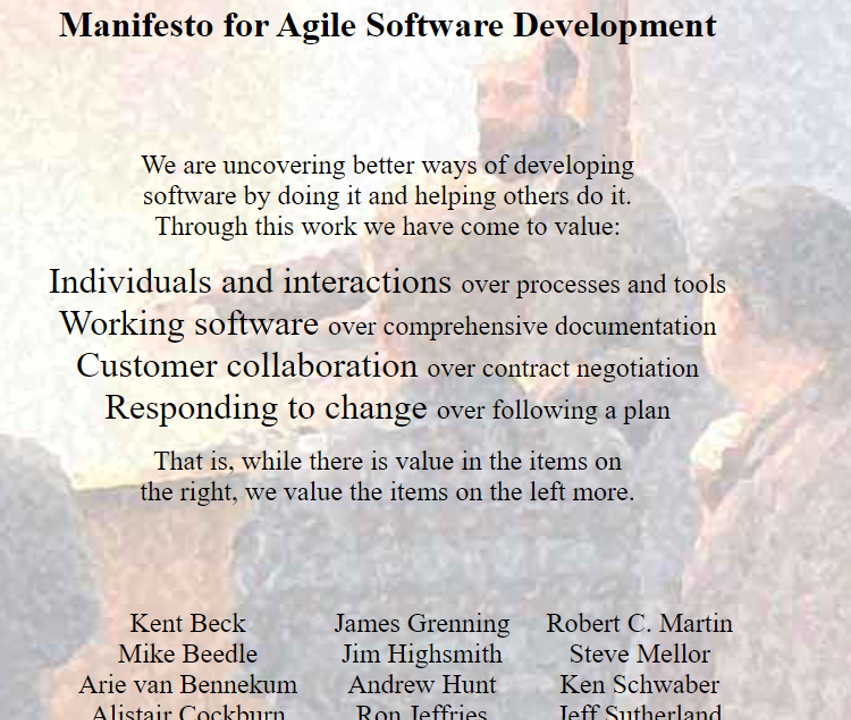
Agile Manifesto
- Before Agile 2000
- Group of industry expert met to outline the values and principles that will help all software teams.
- Agile mainfesto
- Methodologies
Agile Development Methodologies
- Agile = flexible, fast, and adaptive
- Popular methods include Scrum, Extreme Programming (XP), and Kanban
- Work is done in short cycles called sprints (2–4 weeks)
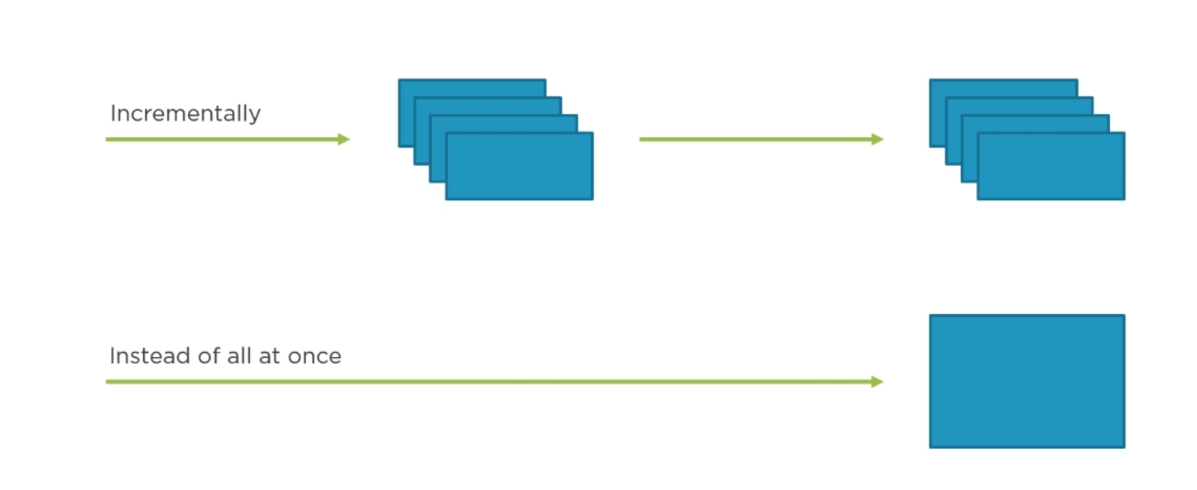
- Each sprint produces a working version of the software (incremental delivery)
- Frequent collaboration and feedback from customers and cross-functional teams
- Adapts quickly to changes in requirements or business needs
- Best for projects where requirements are unclear or changing
- Fits well with startups, small teams, or innovative products
Incremental Development
Agile Methodologies Assessment
| Strengths | Weaknesses |
|---|---|
| Fast delivery of results | Requires discipline |
| Works well in projects with undefined or changing requirements | Significant user involvement is essential |
| Customer satisfaction by rapid , continuous delivery of quality software | Difficult to assess the effort at the beginning of the SDLC |
| Continuous attention to technical excellence and good design | Potential for scope creep |
| People and interactions are emphasized rather than process and tools | Harder for new starters |
| Cost can increase as testers are required all the time |
| Usefulness in Developing Systems | Waterfall | Parallel | V‐Model | Iterative | System Prototyping | Throwaway Prototyping | Agile Development |
|---|---|---|---|---|---|---|---|
| With unclear user requirements | Poor | Poor | Poor | Good | Excellent | Excellent | Excellent |
| With unfamiliar technology | Poor | Poor | Poor | Good | Poor | Excellent | Poor |
| That are complex | Good | Good | Good | Good | Poor | Excellent | Poor |
| That are reliable | Good | Good | Excellent | Good | Poor | Excellent | Good |
| With short time schedule | Poor | Good | Poor | Excellent | Excellent | Good | Excellent |
| With schedule visibility | Poor | Poor | Poor | Excellent | Excellent | Good | Good |
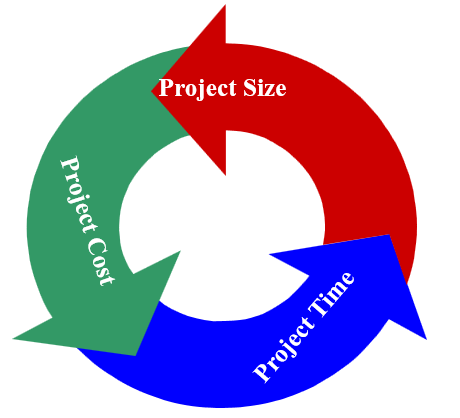
Project Manager’s Balancing Act
- Project Management involves making trade-offs.....
- Modifying one element requires adjusting the others
Project Estimation
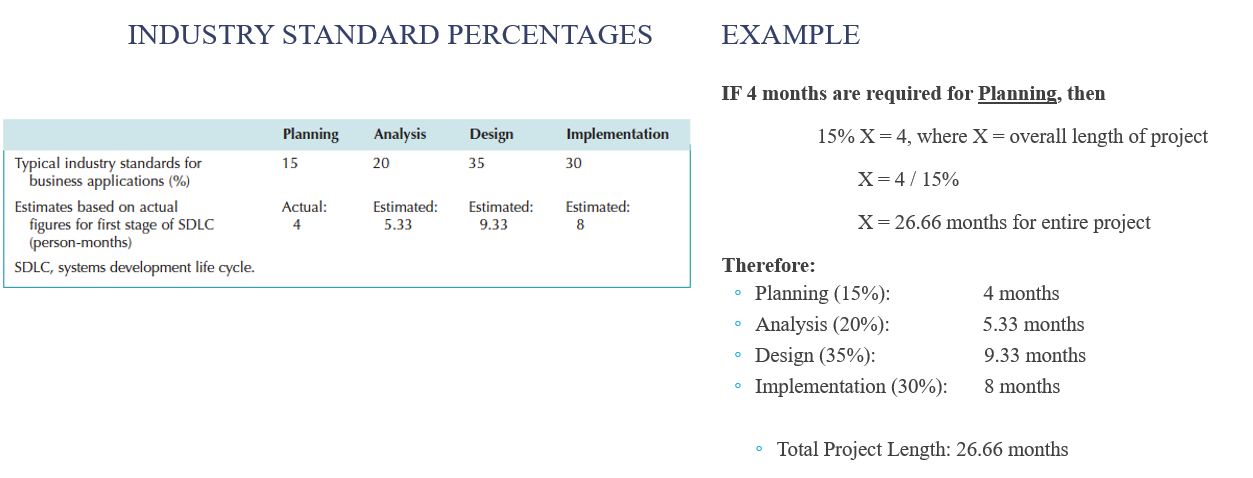
- The process of assigning projected values for time and effort
- Sources of estimates
- Methodology in use
- Actual previous projects
- Experienced developers
- Estimates begin as a range and become more specific as the project progresses
- Industry standards
Project Estimates Using Industry Standard Percentages
Identifying Tasks
- Use established guidelines – existing methodologies
- Use analogies – model previous projects’ task lists
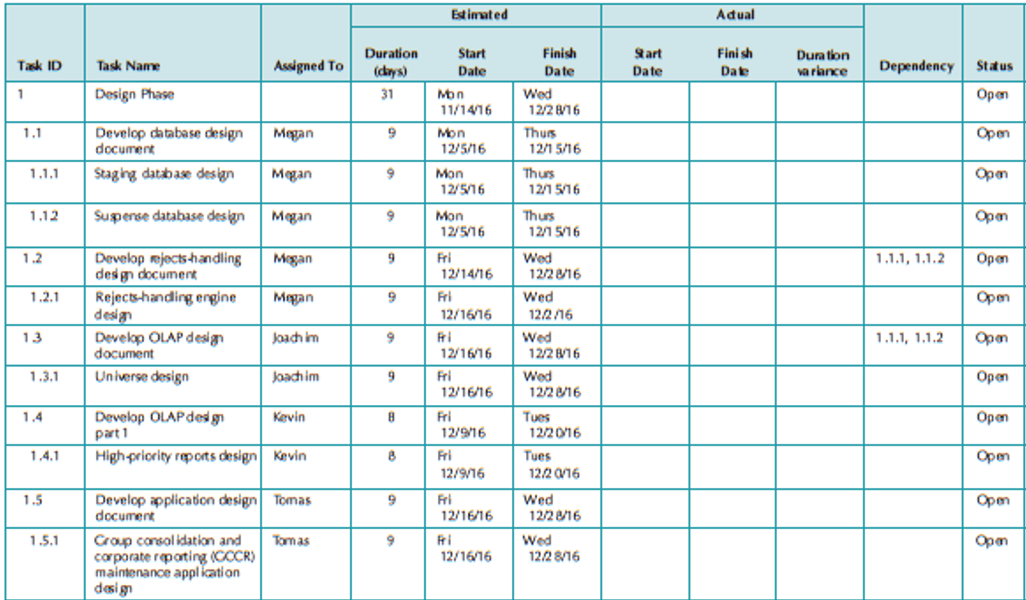
- Top-down approach – break high level tasks into smaller, detailed tasks
- Organize into work breakdown structure
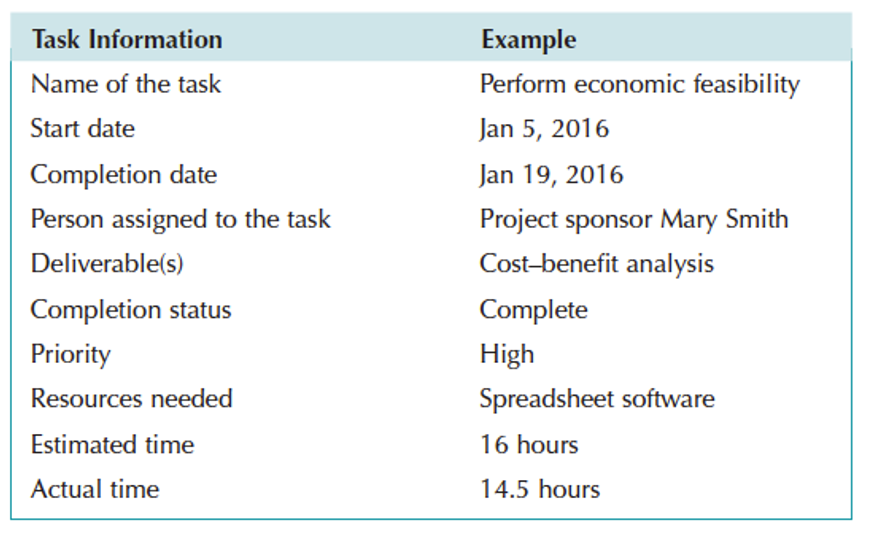
Typical Workplan Entry
Project Plan
Staffing Considerations
- Match skills to project needs whenever possible
- Consider technical skills and interpersonal skills
- All IS work is done in teams
- Technical skills are not sufficient – need to be able to work with others
- Use training and outside sources (consultants, vendor support) when skills are not readily available
- Staffing levels will change over a project’s lifetime
- Adding staff adds overhead; not always productive
Motivation
- Consider the “de-motivators” … DO NOT
- Assign unrealistic deadlines
- Ignore good efforts
- Accept a low-quality product
- Give everyone on the project the same raise
- Make an important decision without the team’s input
- Maintain poor working conditions
Assuring Group Performance
- Make
- Make sure team understands the project and its goals
- Establish
- Establish operating procedures (Project Charter)
- Availability/ Status reporting/ Meetings
- Ensure
- Ensure that team members get to know each other
- Establish
- Establish methods for dealing with problems
Project Estimates Require Refinement
- Even projects with high-quality estimates will need refinement
- Project managers must adjust estimated time throughout the project
Managing Scope
- Beware of scope creep
- Use JAD and prototyping to minimize scope creep pressure
- Implement formal change approval process
- Defer additional requirements as future system enhancements
Timeboxing
- Time estimating techniques may reveal that the project requires more time than we have available
- Timeboxing helps in these situations
- Set a tight but realistic deadline. Identify core, essential functional requirements
- Team limits its focus just to essential functions
- High quality is stressed
- Other functions will be added later
- Repeat to add refinements and enhancements
When a Target Date is Missed
- Don’t assume you can catch up easily. For example, finishing 3 weeks of work in 1 week is usually unrealistic.
- You can only make up time if certain conditions are met:
- The remaining work is easier than the part you fell behind on. For example, testing a simple module after falling behind on coding a complex module.
- The rest of the work is simpler than you expected when planning. For example, a small feature might take less time than originally estimated.
- Check how difficult the remaining tasks are before changing the schedule. For example, review upcoming tasks before deciding to shorten deadlines.
- Adding more people doesn’t always help. For example, bringing extra programmers late in the project may slow things down because they need training first.
Project Methodology Discussion
Select a methodology that fits the Foosball.com
Create a backlog
Github Project
Thank you
- Group Project
- Github project training
- Github Project video
- Classwork: Create a backlog for Foosball.com