< Generics >
What is Generics?
- Generics checks errors at compile time.
- Generics helps in type safety without copy and paste.
- Generics allow you to abstract over types. The most common examples are container types, such as those in the Collections hierarchy.
- It is suitable for the instance of a class
Generic Examples
- Github code sample Generic
Generic Class Demo
Advantage of Java Generics
- Type-safety : We can hold only a single type of objects in generics. It doesn’t allow to store other objects
- Type casting is not required: There is no need to typecast the object.
- Compile-Time Checking: It is checked at compile time so problem will not occur at runtime. The good programming strategy says it is far better to handle the problem at compile time than runtime
- Github code sample Generic
Type Safe
Generic Method
Generic Interface
Generic Type Interface
- Generic type can be defined for a class or interface.
- Generic cannot be used for static instance
- Only generic classes can implement generic interfaces. Normal classes can’t implement generic interfaces.It must mention the type For example, above generic interface can be implemented as,code Generic Interface


Generics Summary: What Works?
| Code Snippet | Valid? | The Simple Reason |
|---|---|---|
class Gen<T> implements Intf<T> |
YES | Both use the flexible label "T". They match. |
class Norm implements Intf<T> |
NO | Normal class isn't flexible; it doesn't know "T". |
class Norm implements Intf<Integer> |
YES | The class picked a specific type (Integer). |
class class0 implements Intf<Integer> |
YES | Specific types always work for non-generic classes. |
class class5<T> ... Intf<Integer> |
NO | Conflict! Can't be flexible (T) and fixed (Integer). |
Generics: Valid vs. Invalid (Detailed)
✅ VALID (Correct)
// 1. PASSING THE PLACEHOLDER
// Class Gen defines 'T', so it is allowed
// to pass that 'T' to the Interface.
// They are both flexible.
class Gen<T> implements Intf<T> { }

// 2. SEALING THE TYPE
// Class Norm is NOT generic, but it
// provides a concrete type (Integer).
// The Interface is now "locked" to Integer.
class Norm implements Intf<Integer> { }
Rule: To use 'T', the class must own 'T' in its signature.
❌ INVALID (Errors)
// ERROR: UNDEFINED SYMBOL
// Norm is a regular class. It has no
// definition for 'T', so it can't
// pass it to the interface.
class Norm implements Intf<T> { }

// ERROR: TYPE CONFLICT
// Gen<T> promises flexibility, but
// 'implements Intf<Integer>' forces
// a specific type. You can't be both!
class Gen<T> implements Intf<Integer> { }
Problem: You cannot reference a generic label you haven't declared.
Type Inference (Diamond Operator)
Introduced in Java 7 to reduce boilerplate code.
// Before Java 7 (Repetitive):
List<String> list = new ArrayList<String>();
// Java 7+ (Clean):
List<String> list = new ArrayList<>();
- Checks the Left Side: It sees
List<String>. - Checks the Right Side: It sees
<>. - Inference: It assumes the Right Side must also be
String.
Generic Method
- Github code Generic Method
Generic Raw Types
- You can use a generic class without specifying a concrete type.
- When generics were introduced in JDK 1.5, raw types were retained only to maintain backwards compatibility with older versions of Java. Although using raw types is still possible, they should be avoided:
- A generic class such as ArrayList used without parameter type is known as raw type.
- Rawtype is unsafe.
- When to Use Raw Types Raw types should only be used in rare cases, such as: Interacting with legacy code that does not use generics.Working with libraries or frameworks that require raw types. In all other cases, always use generics with type parameters to ensure type safety and avoid runtime errors.
- Github code Generic Raw Type
What is a "Raw Type"?
A Raw Type occurs when you use a generic class (like ArrayList) without specifying the type (e.g., <String>). It is a "Legacy Mode" kept for older code.
✅ Generics (Safe)
// Compiler knows it's a String
List<String> safe = new ArrayList<>();
safe.add("Java");
// safe.add(123); // COMPILER ERROR
The compiler "watches your back" to prevent errors.
❌ Raw Type (Unsafe)
// Compiler doesn't know the type
List raw = new ArrayList();
raw.add("Java");
raw.add(123); // NO ERROR HERE!
// BOOM! Runtime ClassCastException
String s = (String) raw.get(1);
You are responsible for every error.
Bounded Type Parameters
- For e.g. you want to find an average of two or more numbers using array, the complier does not know whether you are entering string or number. This could cause compile-time error
- if a generic class is having operations of numeric type only then there is no need to have any other type except numeric type as the type argument
- To declare a bounded type parameter, list the type parameter’s name, followed by the extends keyword, followed by its upper bound, similar like below method. Extends keyword for both Classes and Interfaces.
- Bounded type parameters can be used with methods as well as classes and interfaces
- < T extends A1 & A2 & A3 > No matter whether it is class or interface.
- Java Generics supports multiple bounds .
- Github code BoundedType Class and Method
- Github code BoundedType Class and Interface
The Problem: Generics are "Too Flexible"
If we use a simple <T>, the compiler allows any object. But you can't do math on a String!
// This class is intended for Math...
class Calculator<T> {
T[] nums;
double average() {
// ERROR: The compiler doesn't know if T is a number!
// It won't let you use .doubleValue()
}
}
The Solution: Bounded Types (The Bouncer)
✅ Single Bound (extends)
// T MUST be a subclass of Number
// (Integer, Double, Float, etc.)
class Stats<T extends Number> {
    T[] nums;

    double average() {
        double sum = 0;
        for(T n : nums) {
            // Valid! Compiler knows
            // T is a Number.
            sum += n.doubleValue();
        }
        return sum / nums.length;
    }
}
Extends works for both Classes and Interfaces here!
⛓️ Multiple Bounds (&)
// T must be a Number
// AND it must be Comparable
class MultiBound<T extends Number & Comparable<T>> {

    // This allows us to do math
    // AND compare two values
    // to find the largest.

    boolean isGreater(T a, T b) {
        return a.doubleValue() > b.doubleValue();
    }
}
Note: Use '&' to join multiple requirements.
Summary: Bounded Types
-
Syntax:
<T extends UpperBound>
"T" must be a subclass or implement the "UpperBound". -
The "Extends" Keyword:
In Generics, it means "is a type of." It works for both classes and interfaces. -
Multiple Bounds: Use the
&symbol.
Rule: If you use both a Class and an Interface, the Class must be listed first. -
The Benefit: Catch errors early!
Compile-Time: The compiler checks your work while you code.
Runtime: The program crashes while the user is using it. (Bounds help you avoid this!)
Subtyping
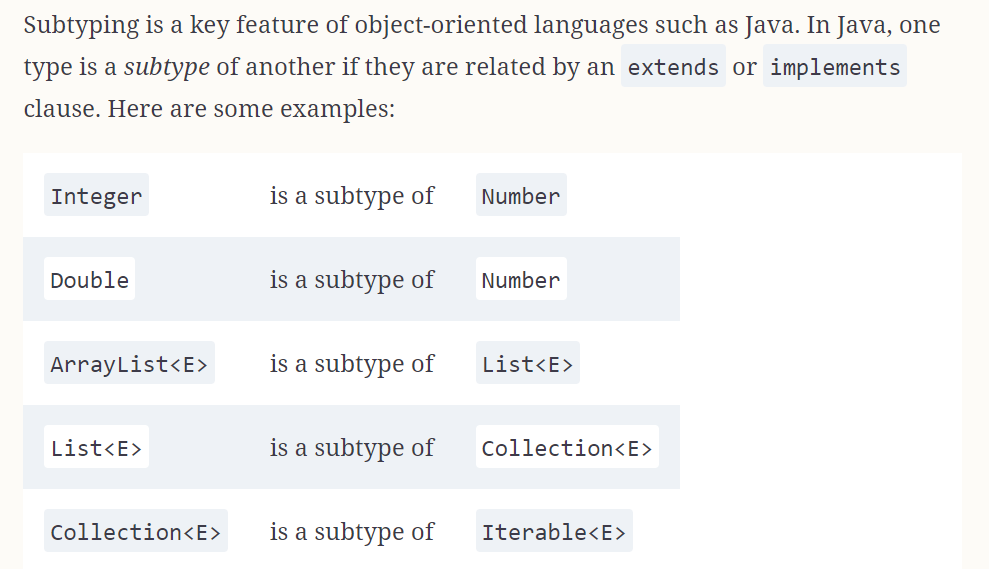
Subtyping in Generics
The Rule: Even if String is a Object, List<String> is NOT a List<Object>.
❌ Why it fails
List<String> str = new ArrayList<>();
// List<Object> obj = str; // ERROR
Java prevents this to stop you from adding an Integer into a String list.
✅ The Wildcard Fix
// Use '?' to allow subtyping
List<? extends Object> obj = str;
The ? acts as a flexible "type placeholder."
<? extends T>: Read-Only (Get items out).<? super T>: Write-Only (Put items in).
Sub-Typing
Github code Sub Typing
Wildcard Generic Types
Wildcards (?) provide the flexibility that strict Generics forbid.
Accepts anything. Read-only.
Upper Bound. Perfect for Reading.
Lower Bound. Perfect for Writing.
- Why?
List<Integer>is NOT aList<Number>. - Fix: Wildcards allow you to write flexible methods that accept different subtypes.
Wildcard Types: Quick Reference
| Wildcard Type | Meaning | Best Used For |
|---|---|---|
<?> (Unbounded) |
"Anything goes." | Counting or printing generic lists. |
<? extends T> (Upper) |
"T or its children." | Reading data (Producers). |
<? super T> (Lower) |
"T or its parents." | Writing/Adding data (Consumers). |
List<Integer> is not a List<Number>.
Java enforces this strictly to prevent type pollution (e.g., trying to add a Double into an Integer list).
The "Strict" Problem vs. The Wildcard Fix
❌ The Strict Error (Invariance)
List<Integer> ints = new ArrayList<>();
ints.add(10);

// ERROR: Incompatible types!
// Even though Integer IS-A Number,
// List<Integer> IS-NOT-A List<Number>
List<Number> numList = ints;

// WHY? If this worked, I could do:
numList.add(3.14); // Adding a Double to an Integer list!
✅ The Wildcard Fix
List<Integer> ints = new ArrayList<>();
ints.add(10);

// VALID: Use '?' to allow flexibility.
// "I accept a list of Numbers OR any child"
List<? extends Number> flexibleList = ints;

// Note: You can READ from this safely
Number n = flexibleList.get(0);

// But you CANNOT add to it (Read-Only)
// flexibleList.add(3.14); // ERROR
| Type | Syntax | Rule |
|---|---|---|
| Upper Bound | ? extends T |
Allows subtyping for Reading. |
| Lower Bound | ? super T |
Allows subtyping for Writing. |
Unbound
- The unbounded wildcard type is specified using the wildcard character (?)—for example, (List of ?). This is called a list of unknown type.
- Java generics unbounded wildcards : Unbounded wildcard is used for list of unknown types using '?'(Type is not bounded)
- Github code Unbound Wildcards
Unbounded Wildcards ()
Use <?> when your code doesn't care about the specific type.
✅ The Wildcard Way
// Accepts List<String>, List<Integer>, etc.
void processList(List<?> list) {
    // We can READ as Object
    for (Object obj : list) {
        System.out.println(obj);
    }
}
- "Unknown Type": You can't add anything to this list (except
null) because Java doesn't know what it's supposed to hold. - Read-Only: You can only get items out (as
Object).
Upper-Bounded Wildcards extends
- To declare an upper-bounded wildcard, use the wildcard character (?), followed by the extends keyword, followed by its upper bound.
- Upper-bound is when you specify (? extends Field) means argument can be any Field or subclass of Field.
- List (extends Number) represent a list of Number or its sub-types such as Integer
- For example, < ? extends Number> means the type can be Number, Integer, Double, Float, etc
- Upper Bound: Used when you want to relax the restrictions on a variable, i.e. you want to write a method that works on List
- Github code Upper-Bounded Wildcards
Upper-Bounded Wildcards (<? extends T>)
Allows a method to accept a list of the type OR any of its sub-types.
// The "Relaxed" Method:
// Accepts List, List, etc.
public void printSum(List<? extends Number> list) {
    for (Number n : list) {
        System.out.println(n.doubleValue());
    }
}

// How we call it:
List<Integer> ints = Arrays.asList(1, 2, 3);
List<Double> doubles = Arrays.asList(1.1, 2.2);

printSum(ints);    // VALID!
printSum(doubles); // VALID!
Lower-Bounded Wildcards super
- Suppose we want to add Integers to a list of integers in a method, we can keep the argument type as List (Integer)
- It will be tied up with Integers whereas List Number and List Object can also hold integers, so we can use lower bound wildcard
- We use generics wildcard (?) with super keyword and lower bound class to achieve this.
- super is used to specify an lower bound wildcard.
- Lower Bounded Wildcards: List(? super Integer) represents a list of Integer or its super-types Number and Object
- Github code Lower-Bounded Wildcards
Lower-Bounded Wildcards (<? super T>)
Use <? super T> when you need to WRITE (add) items into a collection.
// The "Bucket" Method:
// We can add Integer, but we can't guarantee what we get back.
public void addItems(List<? super Integer> list) {
    list.add(5);  // VALID
    list.add(10); // VALID

    // WARNING: When you read, you only know it's an Object.
    // Object obj = list.get(0);
}
• Producer Extends (
<? extends T>) - Use for READING.
• Consumer Super (
<? super T>) - Use for WRITING.
When to use super and extends
- use Upper bounded wildcard ( extends) when you only get values out of the collection
                            List numbers = new ArrayList< Integer>();
                            Number num = numbers.get(0); // Valid: Reading is allowed
                            // numbers.add(10); // Invalid: Cannot add to a list of unknown subtype
                            List numbers = new ArrayList< Number>();
                            numbers.add(10); // Valid: Adding is allowed
                            // Integer num = numbers.get(0); // Invalid: Reading returns Object
                            Object obj = numbers.get(0); // Valid: Reading as Object
                            List < Integer> numbers = new ArrayList<>();
                            numbers.add(10); // Valid: Adding is allowed
                            Integer num = numbers.get(0); // Valid: Reading is allowed
Type Erasure: The "Ghost" Trick
Generics are scaffolding: The compiler uses them to build the house safely, then tears them down before the program runs.
1. At Compile Time (Your Code)
The compiler sees your "Labels":
List<String> list = new ArrayList<>();
list.add("Hello");

// Compiler: "I see the String label.
// I will block any Integers!"
2. At Runtime (The Reality)
The labels are ERASED:
List list = new ArrayList();
list.add("Hello");

// JVM: "I don't see any labels.
// To me, this is just a List of Objects."
- No Primitives:
List<int>is illegal becauseintisn't an Object. - No new T(): You can't bake a cake (
new T) if the recipe is erased! - No Overloading:
print(List<String>)andprint(List<Integer>)look identical to the computer.